How To read or modify NPC Data#
Warning
Work in progress page! This will change soon.
Getting NPC data#
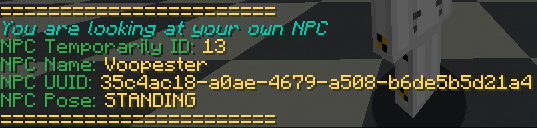
You can take out an piece of paper item and then shift and right click on the NPC to able to see a quick data what is the NPC about. Sample data you can see in the screenshot below
Getting temporally assigned ID#
Attention
Every server restart or plugin reload/restart will cause the temporary ID to be reset or changed to be a different value now in the screenshot below it says 13, but after a restart or plugin reload it may or may not be different. For transparency, these ids are made temporary because of few functions with in the plugin itself since the actual NPC ids are stored as UUIDs.
You take out a piece of paper shift right click on the NPC to get the data for it and you should be look for NPC Temporarily ID or screenshot below

Changing NPC Name#
Hint
To order to get your NPC assigned ID click here to find out
Order to change your NPC name you need to run this following command
/rpnpc updatename <TEMP ID> <New Name and spaces are allowed>